
SECTION 1
Historical Context & Motivation
The concept of safe computing arose out of a fundamental tension at the heart of networked technology: the same openness that makes the internet transformative also makes it vulnerable. In the earliest days of ARPANET, security was barely an afterthought because the network connected a small community of trusted researchers at universities and government labs. As the network expanded beyond that circle, malicious actors began exploiting the protocols and trust assumptions built into its design. The history of safe computing is therefore the history of an escalating arms race between those who seek to exploit digital systems and those who engineer defenses against such exploitation.
1988 • The Morris Worm
2000 • ILOVEYOU Virus & Mass Social Engineering
2013 • Snowden Revelations & Privacy Awareness
2017 • Equifax Data Breach
2023 • AI-Powered Phishing & Deepfakes
Each of these milestones reveals a recurring pattern: new capabilities create new attack surfaces, which in turn demand new defenses. The central question that safe computing addresses is deceptively simple — how can individuals and organizations use digital systems while minimizing the risk of unauthorized access to data and identity? Answering that question requires understanding threats, authentication, encryption, and the social dimensions of cybersecurity.
SECTION 2
Core Principles & Definitions
Safe computing rests on a set of interlocking principles that span both technical mechanisms and human behavior. The AP Computer Science Principles framework organizes these ideas around three pillars: protecting data through encryption and authentication, understanding threats and vulnerabilities, and recognizing the human and legal dimensions of privacy. The following grid captures five foundational ideas that every AP CSP student must internalize.
Personally Identifiable Information (PII)
Authentication & Authorization
Encryption
Malware & Social Engineering
The Principle of Least Privilege
KEY TAKEAWAY
SECTION 3
Visual Explanation — The Threat Landscape
The diagram above organizes threats into two broad categories. Social-engineering attacks like phishing exploit human psychology — the attacker crafts a convincing message that tricks the target into revealing credentials or installing malware. Technical attacks like malware and rogue access points exploit software or hardware vulnerabilities. In practice, the most damaging incidents blend both: a phishing email (social) delivers a keylogger (technical) that captures the user's banking password (credential compromise) and exfiltrates it to a remote server (data breach). Understanding this interconnected landscape is the first step toward building effective defenses.
SECTION 4
How Encryption & Authentication Work
Symmetric vs. Asymmetric Encryption
At its core, encryption transforms readable data (plaintext) into an unreadable form (ciphertext) using an algorithm and a key. In symmetric encryption, the same key is used for both encryption and decryption — fast but problematic for key distribution, because both parties must securely share the key in advance. In asymmetric (public-key) encryption, each party has a key pair: a public key (shared openly) and a private key (kept secret). A message encrypted with someone's public key can only be decrypted with the corresponding private key. This elegant mechanism solves the key-distribution problem and underpins HTTPS, digital certificates, and secure email.
SYMMETRIC ENCRYPTION
E is the encryption function, D is the decryption function, and Key is the single shared secret used for both operations.
ASYMMETRIC ENCRYPTION
The sender encrypts with the recipient's public key; only the recipient's private key can reverse the operation. The mathematical difficulty of deriving the private key from the public key ensures security.
Multi-Factor Authentication (MFA)
Multi-factor authentication strengthens login security by requiring two or more independent factors drawn from three categories: something you know (a password or PIN), something you have (a phone or hardware token), and something you are (a fingerprint or face scan). Even if an attacker compromises one factor — say, they steal a password via phishing — they cannot complete authentication without the second factor. The AP CSP exam frequently tests whether students can identify which factors belong to which category and explain why MFA is more secure than single-factor authentication.
CERTIFICATE AUTHORITIES & HTTPS
SECTION 5
Detailed Breakdown — Threats & Defenses
| Threat | Description | Primary Defense |
|---|---|---|
| Phishing | Fraudulent messages impersonating trusted entities to steal credentials or install malware. | User training, email filters, MFA to limit damage if credentials are stolen. |
| Ransomware | Malware that encrypts a victim's files and demands payment for the decryption key. | Regular offline backups, up-to-date software patches, network segmentation. |
| Keylogger | Software or hardware that records keystrokes to capture passwords and sensitive input. | Anti-malware software, MFA (second factor bypasses captured passwords). |
| Rogue Access Point | A malicious Wi-Fi hotspot that intercepts data from connecting devices. | VPN usage on untrusted networks, HTTPS enforcement, avoiding open Wi-Fi. |
| Data Breach | Unauthorized access to a database, often exposing millions of PII records. | Encryption at rest, least-privilege access, prompt software patching. |
Common threats and their primary defenses
A critical point for the AP exam is that no single defense is foolproof. Even strong encryption is useless if the user's password is password123 and they click every link in their inbox. Conversely, the most security-literate user in the world cannot compensate for a company that stores PII in an unencrypted, internet-facing database. Effective security demands that defenses at every layer operate simultaneously and are kept up to date.
SECTION 6
Worked Example — Analyzing a Security Scenario
The following worked example walks through a realistic scenario that mirrors the kind of analysis the AP CSP exam expects. A student receives an email that appears to be from their university's IT department. The email asks the student to click a link and enter their university login credentials to "verify their account." Let us evaluate this situation step by step.
Identifying and Responding to a Phishing Attack
- 1
Step 1 — Identify the Threat Type
The email asks the recipient to click a link and enter credentials, which is the hallmark of a phishing attack. Phishing is a form of social engineering in which the attacker impersonates a trusted entity to trick the victim into divulging sensitive information. The fact that the email appears to come from the university's IT department makes it more convincing — a technique known as pretexting.Threat identified: phishing via email - 2
Step 2 — Assess the Potential Damage
If the student enters their credentials on the fake site, the attacker gains access to the university account. Depending on the institution's systems, this could expose PII (grades, financial aid records, Social Security number), allow the attacker to send further phishing emails from the compromised account, or provide a foothold for lateral movement within the network.Potential damage: PII exposure, account takeover, cascading attacks - 3
Step 3 — Identify Red Flags
Several indicators suggest the email is fraudulent: (1) the link URL, when hovered over, points to a domain that does not match the university's official domain; (2) the message uses urgency ("your account will be deactivated within 24 hours") to pressure the recipient; and (3) the email may contain subtle grammar or formatting errors inconsistent with official communications.Red flags: mismatched URL, artificial urgency, formatting errors - 4
Step 4 — Apply Defensive Measures
The student should not click the link. Instead, they should navigate directly to the university's official website by typing the URL manually. They should report the suspicious email to the university's IT security team. If MFA is enabled on their account, even a compromised password would not grant the attacker full access — a concrete example of why MFA is a critical defense layer.Response: do not click, navigate directly, report, rely on MFA - 5
Step 5 — Generalize the Principle
This scenario illustrates that technical controls (encryption, firewalls) are necessary but not sufficient. The human layer of defense — the user's ability to recognize and resist social engineering — is often the deciding factor. On the AP exam, questions about phishing frequently test whether students understand that the attack exploits human trust rather than a software vulnerability.Key insight: phishing exploits people, not code
 A familiar logo or urgent message does not establish the sender’s identity. Use a separately trusted route to reach the service and report suspicious requests.
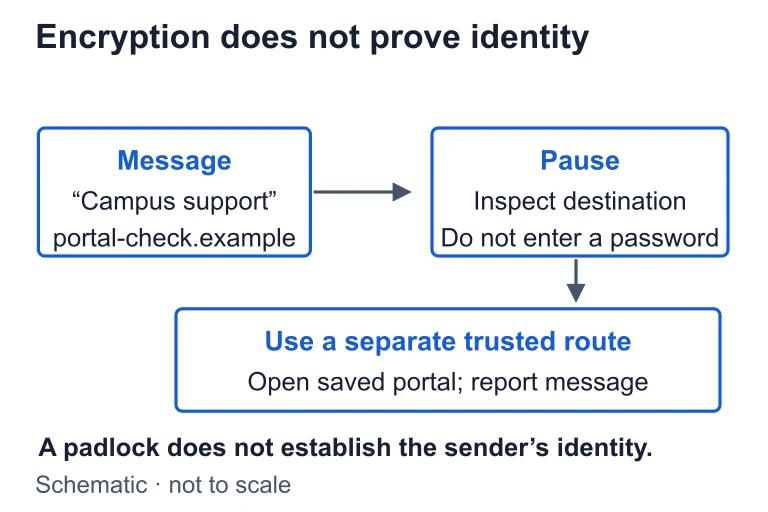 In this campus-message example, portal-check.example is the destination to inspect. Reach the campus service through a separate trusted route; encryption to a site does not identify the message sender.
SECTION 7
Tradeoffs — Security vs. Usability
One of the most important themes in safe computing is the inherent tension between security and usability. Every security measure introduces friction: longer passwords are harder to remember, MFA adds an extra step to login, and encryption can slow data transfer. System designers must balance the need to protect data against the need to keep systems accessible and user-friendly. The AP CSP exam frequently frames questions around these tradeoffs.
| Security Measure | Benefit | Tradeoff / Limitation |
|---|---|---|
| Strong, unique passwords | Resist brute-force and dictionary attacks; credential stuffing fails. | Difficult to remember; leads to insecure workarounds like sticky notes. Mitigated by password managers. |
| Multi-Factor Authentication | Dramatically reduces risk of account compromise even if password is leaked. | Adds login friction; requires a secondary device; can lock out users who lose their second factor. |
| End-to-end encryption | Only sender and recipient can read messages; service provider cannot access content. | Hinders lawful investigation; makes content moderation impossible; key loss means permanent data loss. |
| Frequent software updates | Patches known vulnerabilities before they can be exploited. | Updates may introduce new bugs; require restarts; consume bandwidth and time. |
| Data minimization | Collecting less PII reduces breach impact; limits liability. | May reduce functionality, personalization, or analytical capabilities. |
Security measures and their associated tradeoffs
KEY TAKEAWAY
SECTION 8
Connection to Privacy, Ethics & Regulation
Safe computing is not purely a technical discipline; it intersects deeply with ethics, law, and public policy. The AP CSP framework expects students to reason about how computing innovations affect privacy and to understand the role of regulations in shaping the digital landscape. Data privacy — the right of individuals to control how their PII is collected, used, and shared — is a concept that varies significantly across legal systems and cultural contexts.
| Concept | AP CSP Focus | Advanced / Real-World Extension |
|---|---|---|
| PII collection | Websites and apps collect PII through forms, cookies, and tracking; users should understand what they share. | GDPR requires affirmative consent for data collection; CCPA gives California residents the right to request deletion of their data. |
| Cookie tracking | Third-party cookies track users across websites, enabling targeted advertising and building user profiles. | Browser vendors are phasing out third-party cookies; fingerprinting and server-side tracking are emerging alternatives. |
| Encryption debates | Encryption protects user privacy but can also shield illegal activity from law enforcement. | The "going dark" debate: governments argue for backdoors; cryptographers warn that any backdoor weakens security for all users. |
| Terms of Service | Users often agree to broad data-sharing terms without reading them, granting companies extensive rights over their data. | "Dark patterns" in UI design nudge users toward less privacy-protective choices; regulatory efforts aim to require clear, accessible disclosures. |
AP CSP concepts and their real-world extensions in privacy and regulation
Looking forward, safe computing will increasingly intersect with artificial intelligence. AI systems trained on vast datasets raise novel privacy concerns — for instance, a model might inadvertently memorize and reproduce PII from its training data. The next generation of privacy regulations will likely address algorithmic transparency, the right to explanation, and the governance of biometric data used in facial recognition. Students who master the safe-computing principles in this lesson will have the conceptual vocabulary to engage with these evolving challenges.
SECTION 9
Practice Problems
Question 1: CONCEPTUAL
- A. A keylogger attack that records the user's keystrokes
- B. A phishing attack that uses social engineering to steal credentials
- C. A rogue access point attack that intercepts Wi-Fi traffic
- D. A ransomware attack that encrypts the user's files
Show answer (B)
Question 2: BASIC
- A. Both factors are "something you know"
- B. The password is "something you know" and the phone code is "something you are"
- C. The password is "something you know" and the phone code is "something you have"
- D. The password is "something you have" and the phone code is "something you know"
Show answer (C)
Question 3: INTERMEDIATE
- A. Using a Virtual Private Network (VPN) to encrypt all traffic between the device and the VPN server
- B. Ensuring that all visited websites use HTTPS rather than HTTP
- C. Deleting the browser's cookies after the session ends
- D. Using a longer password for the email account
Show answer (A, B)
Question 4: APPLIED
3 ptsShow answer
Question 5: CRITICAL THINKING
4 ptsShow answer
SUMMARY
Summary — Safe Computing
Summary
Safe computing is the practice of protecting digital data, identity, and systems through layered defenses. Personally identifiable information (PII) — any data that can identify a specific individual — is the primary target of attacks. Encryption (both symmetric and asymmetric) protects data in transit and at rest, while multi-factor authentication (MFA) strengthens identity verification by combining knowledge, possession, and biometric factors. Threats range from technical attacks (malware, keyloggers, rogue access points) to social engineering (phishing, pretexting), and the most effective defense strategies layer multiple barriers in a defense-in-depth model.
Beyond technology, safe computing requires navigating tradeoffs between security and usability and understanding the ethical and legal dimensions of data privacy. The principle of least privilege limits access rights to the minimum necessary, reducing potential damage from compromised accounts. On the AP CSP exam, expect questions that ask you to identify types of attacks, explain how defensive measures work, categorize MFA factors, and reason about the benefits and risks of encryption and data-collection practices.