
SECTION 1
Historical Context & Motivation
The concept of the digital divide emerged in the mid-1990s as internet adoption began accelerating in wealthy nations while leaving large portions of the global population without access. As networked computing rapidly transformed commerce, education, governance, and social interaction, researchers and policymakers recognized that unequal access to these technologies was not merely an inconvenience but a structural barrier capable of deepening existing socioeconomic inequalities. The term was popularized by the U.S. National Telecommunications and Information Administration (NTIA) in a series of reports that documented stark disparities in computer and internet access across income levels, racial groups, and geographic regions. Understanding the historical trajectory of the digital divide reveals that each wave of technological innovation—from personal computers to broadband to smartphones—has introduced new dimensions of inequality even as it resolved some older ones.
1995 • NTIA 'Falling Through the Net' Report
2000 • Dot-Com Boom & Global Awareness
2007 • Smartphone Revolution
2020 • COVID-19 Pandemic
2021–Present • Broadband Equity Legislation
This history raises the central question the AP Computer Science Principles curriculum asks you to grapple with: How does unequal access to computing and the internet affect individuals and society, and what can be done to bridge the gap? Answering this question requires understanding not just who lacks access, but why—and recognizing the multiple layers of the divide that extend beyond mere hardware availability.
SECTION 2
Core Principles & Definitions
The digital divide is not a single, monolithic gap but a multidimensional phenomenon. Scholars typically distinguish between at least three levels of the divide, each layered upon the last. Addressing one level without attending to the others produces an incomplete solution—providing a device without teaching someone to use it, for instance, does not meaningfully close the divide. The AP CSP framework expects you to recognize these layers and reason about how they interact with demographic factors including income, geography, age, education, and disability status.
First-Level Divide: Access
Second-Level Divide: Usage & Skills
Third-Level Divide: Outcomes
Demographic Dimensions
Global vs. Domestic Divide
SECTION 3
Visual Explanation: Layers of the Digital Divide
The diagram above illustrates the hierarchical relationship among the three levels. Notice that each level builds upon the one below it, forming a dependency chain. A community may receive donated laptops (addressing Level 1), but without training programs (Level 2) and locally relevant digital content (Level 3), those laptops may sit unused or serve only for passive entertainment rather than empowerment. This layered model helps explain why simply increasing device distribution or expanding Wi-Fi coverage—while necessary—is insufficient on its own. The AP CSP exam frequently tests your ability to identify which level of the divide a given scenario addresses, and to reason about what additional interventions might be needed.
SECTION 4
How the Digital Divide Operates
Feedback Loops & Compounding Effects
The digital divide does not operate in isolation—it interacts with existing social and economic structures through positive feedback loops that can either accelerate advantage or deepen disadvantage. When a student has reliable internet access, they can complete homework more efficiently, access supplementary educational resources, develop digital skills valued by employers, and ultimately earn higher income—which then funds continued access to technology. Conversely, a student without reliable access falls behind academically, develops fewer marketable digital skills, earns less, and remains unable to afford quality connectivity. This self-reinforcing cycle means that small initial disparities in access can compound into large disparities in life outcomes over time.
Contributing Factors
- Infrastructure: Rural and remote areas often lack the fiber-optic cabling or cell towers necessary for broadband. Internet service providers may find it unprofitable to build infrastructure where population density is low.
- Affordability: Even where infrastructure exists, monthly service costs and device prices can be prohibitive for low-income households. The FCC's Affordable Connectivity Program was one attempt to subsidize costs.
- Digital literacy: Older adults, recent immigrants, and people with limited formal education may lack the skills to navigate interfaces, evaluate online information, or protect their privacy.
- Content & language: A majority of web content is in English. Non-English speakers or speakers of minority languages face a narrower range of useful online resources.
SECTION 5
Detailed Breakdown by Demographic Dimension
The digital divide manifests differently across demographic categories, and AP CSP exam questions frequently present scenarios that require you to identify which population is most likely affected and why. The table below summarizes the key dimensions and their associated barriers, using data patterns drawn from research by the Pew Research Center and the International Telecommunication Union (ITU).
| Dimension | Barrier Type | Example |
|---|---|---|
| Income | Affordability of devices and broadband subscriptions | Low-income U.S. households are 3× less likely to have home broadband than high-income households |
| Geography | Infrastructure deployment; rural areas lack broadband | Only ~72% of rural Americans have broadband vs. ~83% in urban areas |
| Age | Digital literacy and familiarity with interfaces | Adults 65+ are significantly less likely to own smartphones or use social media |
| Race / Ethnicity | Compounded by income and geographic segregation | Black and Hispanic Americans historically show lower broadband adoption rates, though the gap has narrowed |
| Disability | Accessibility of hardware, software, and web content | People with visual or motor impairments need screen readers or adaptive devices; many websites are not WCAG-compliant |
| Global | National infrastructure, GDP, and governance | Internet penetration exceeds 90% in Europe but remains below 40% in parts of Sub-Saharan Africa |
Key demographic dimensions of the digital divide
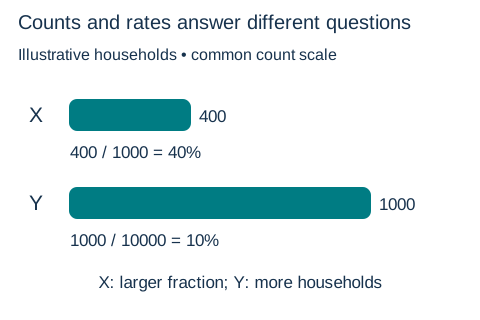 Suppose community X has 400 unconnected households out of 1,000 and Y has 1,000 out of 10,000. X has the larger unconnected share, 40% versus 10%; Y has more households needing connections.Open full diagram
SECTION 6
Worked Example: Analyzing a Digital Divide Scenario
AP CSP free-response and multiple-choice questions often present a scenario and ask you to identify the digital divide issues at play, explain how computing innovations affect different groups, and propose or evaluate solutions. Let's walk through a representative scenario step by step.
Worked example
- 1
Step 1 — Identify the Innovation
A mid-sized city launches a free telehealth web portal that allows residents to schedule medical appointments, consult with doctors via video, and access prescription records online. The city advertises the portal as a way to improve healthcare access for all residents. - 2
Step 2 — Identify Beneficial Effects
Residents with broadband internet and modern devices can see doctors without traveling, reducing wait times and transportation costs. Working parents can schedule appointments during breaks. People in well-connected neighborhoods experience improved healthcare convenience.Benefit: Increased healthcare accessibility for digitally connected residents - 3
Step 3 — Identify Harmful Effects or Disparities
Elderly residents unfamiliar with video conferencing may be unable to use the portal (Level 2 divide). Low-income residents without broadband or smartphones cannot access it at all (Level 1 divide). Non-English speakers may find the interface inaccessible if it lacks multilingual support (Level 2/3 divide). Residents with visual impairments may face barriers if the portal is not screen-reader compatible.Harm: The portal widens health disparities by disproportionately benefiting already-advantaged groups - 4
Step 4 — Propose Solutions That Address Multiple Levels
To mitigate these disparities, the city could: (a) set up public internet kiosks in libraries and community centers with telehealth access (Level 1), (b) offer free digital literacy workshops for elderly and low-income residents (Level 2), (c) design the portal to be multilingual and WCAG-compliant for accessibility (Level 2/3), and (d) maintain phone-based appointment options as a non-digital alternative.A comprehensive solution addresses access, skills, and outcomes simultaneously
 Using an online appointment service requires more than a device: connectivity, usable design, skills and a suitable setting affect access. A phone option provides another route.
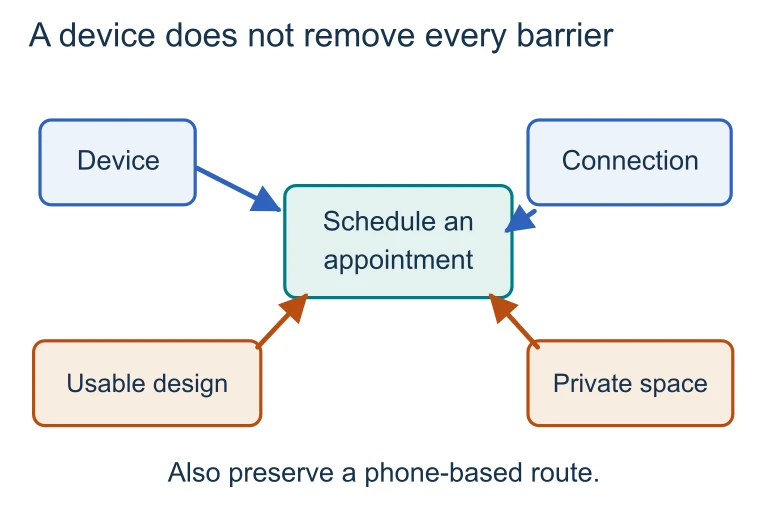 A device, reliable connectivity, usable design and a suitable private space support the appointment task in different ways. A phone-based alternative provides an additional access route.
SECTION 7
Proposed Solutions: Strengths & Limitations
Numerous strategies have been proposed and implemented to close the digital divide. Understanding both their strengths and limitations is essential for AP CSP, where exam questions frequently ask you to evaluate the effectiveness of a given intervention. No single solution is sufficient because the divide is multidimensional; each approach addresses certain layers while leaving others unresolved.
| Intervention | Strengths | Limitations |
|---|---|---|
| Government broadband subsidies | Directly reduce cost barriers (Level 1); can target underserved regions | Require ongoing funding; do not address digital literacy (Level 2) |
| Device donation programs | Put hardware in the hands of those who need it; often paired with refurbished equipment | Donated devices may be outdated; no guarantee of internet connectivity or technical support |
| Public Wi-Fi / library access | Free at point of use; leverages existing public infrastructure | Limited hours; requires travel; not suitable for bandwidth-intensive tasks like video calls |
| Digital literacy training | Addresses Level 2 directly; empowers long-term independence | Resource-intensive; hard to scale; must be culturally and linguistically tailored |
| Mobile-first design | Reaches populations where smartphones are more common than computers, especially in developing nations | Mobile screens limit complex tasks; data plans may be expensive or metered |
Common interventions for the digital divide
SECTION 8
Connection to Broader Computing Concepts
The digital divide does not exist in isolation within the AP CSP curriculum—it connects to several other Big Ideas and Enduring Understandings. Recognizing these connections strengthens your ability to write coherent free-response answers and to identify the broader implications of computing scenarios presented in multiple-choice questions. The table below maps the digital divide to related AP CSP topics.
| Related AP CSP Topic | Connection to Digital Divide |
|---|---|
| Beneficial & Harmful Effects of Computing | Computing innovations can both bridge and widen the divide. A new app benefits connected users while further marginalizing those without access. |
| Crowdsourcing & Citizen Science | Crowdsourced data and citizen science rely on broad participation; the digital divide means underrepresented communities contribute less, leading to biased datasets. |
| Algorithmic Bias | Machine learning models trained on data from digitally connected populations may not generalize to underrepresented groups, perpetuating systemic bias. |
| The Internet & Protocols | Understanding how packets are routed helps explain why infrastructure gaps in rural areas create connectivity deserts—there may literally be no physical path for data. |
| Data Privacy & Security | Digitally marginalized populations may be less aware of privacy risks, making them more vulnerable to phishing, identity theft, and surveillance. |
As you move deeper into AP CSP topics like data analysis and computing innovations, keep the digital divide in mind as a lens for evaluating impact. Every innovation question implicitly asks: who benefits, who is excluded, and how might we make the innovation more equitable? This lens will serve you well both on the exam and as a future computer scientist or informed citizen.
SECTION 9
Practice Problems
Question 1: CONCEPTUAL
- A. Students may not have internet access at home to use the laptops effectively.
- B. Students now have equal access to computing hardware.
- C. The laptops will automatically improve students' digital literacy skills.
- D. The school district has eliminated the digital divide for its students.
Show answer (A)
Question 2: BASIC CALCULATION
- A. Community X, because it has a lower broadband adoption rate.
- B. Community Y, because 40% of 5,000 is 2,000, compared to 65% of 2,000 which is 1,300.
- C. Both communities have the same number of unconnected households.
- D. Community X, because smaller communities always have worse connectivity.
Show answer (B)
Question 3: INTERMEDIATE
- A. Elderly residents who lack digital literacy skills may be unable to navigate the registration interface.
- B. College students who are frequent internet users will find the system inconvenient.
- C. Low-income residents without home internet access may lose the ability to register conveniently.
- D. Software developers who build the system will face increased workloads.
Show answer (A,C)
Question 4: APPLIED
Show answer
Question 5: CRITICAL THINKING