

SECTION 1
Historical Context & Motivation
From the earliest days of telegraphy, engineers have searched for ways to encode messages using fewer symbols. Data compression — the process of reducing the number of bits needed to represent information — is not merely a modern convenience but a foundational problem in information science. As digital media expanded from kilobytes of text to gigabytes of video, the ability to shrink data without losing essential meaning became critical for storage, bandwidth, and cost. Understanding data compression requires appreciating both the mathematical theory behind it and the practical trade-offs that arise when encoding real-world data.
1838 • Morse Code
1948 • Shannon's Information Theory
1952 • Huffman Coding
1977–1978 • Lempel-Ziv Algorithms
1992–2001 • JPEG & MP3 Standards
The central question that runs through this history is deceptively simple: How few bits do we truly need to represent a piece of information, and what happens when we discard some of the data to use even fewer? That question divides compression into two families — lossless and lossy — each with distinct guarantees and trade-offs that the AP CSP exam expects you to understand and evaluate.
SECTION 2
Core Principles & Definitions
All compression techniques rest on a single insight: most data contains redundancy — patterns, repetitions, or information that is less important to human perception. Compression algorithms identify and exploit that redundancy, replacing it with shorter representations. Before examining specific techniques, it is essential to internalize several foundational concepts that appear repeatedly on the AP CSP exam.
Lossless Compression
Lossy Compression
Compression Ratio
Redundancy
Entropy (Information Content)
KEY TAKEAWAY
SECTION 3
Visualizing Lossless vs. Lossy Compression
Notice the fundamental trade-off: the lossy path achieves a much smaller compressed file (80 KB vs. 350 KB), but the cost is irreversibility. Once data is removed during lossy compression, no decompression algorithm can regenerate it. The lossless path guarantees a perfect round-trip — compress and decompress, and you are back where you started. This is why lossless formats are mandatory for text, code, medical images, and legal documents, while lossy formats are acceptable (and often preferred) for consumer media like photos, music, and streaming video, where tiny perceptual differences go unnoticed.
 Fine feather edges and smooth color gradients reveal what survives compression. Lossless decoding restores the input values exactly; lossy decoding can change them.
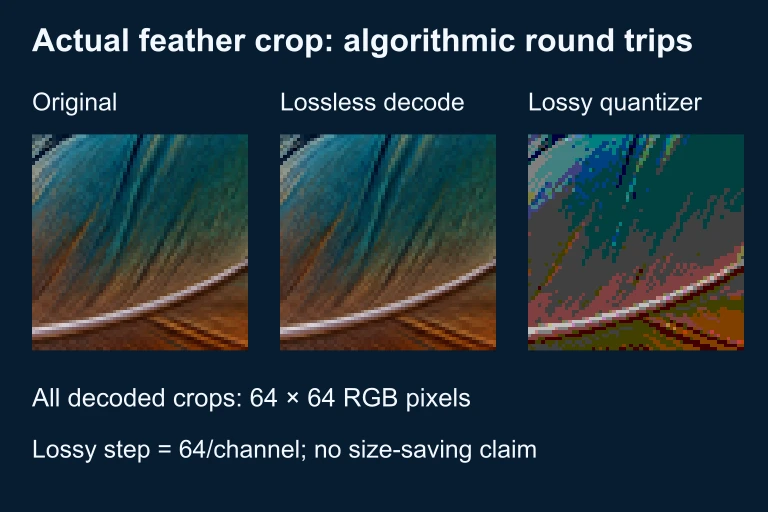 The same 64-by-64 RGB crop passes through both processes. Lossless decoding restores every channel value; the lossy quantizer changes values while preserving the decoded dimensions. Compressed byte count and decoded pixel count measure different things.
SECTION 4
How Compression Algorithms Work
Run-Length Encoding (RLE)
One of the simplest lossless techniques is run-length encoding (RLE). Instead of storing every individual value, RLE replaces consecutive runs of the same value with a single value and a count. For example, the pixel row WWWWWBBBWW (10 characters) becomes 5W3B2W (6 characters). RLE works exceptionally well on data with long homogeneous runs, such as simple bitmap images or fax transmissions, but offers little benefit on data with high variability like photographs.
COMPRESSION RATIO
A ratio greater than 1 indicates the file shrank. For the RLE example above: 10 ÷ 6 ≈ 1.67, meaning the compressed version is about 60% the size of the original.
Huffman Coding
A more sophisticated lossless strategy is Huffman coding, which exploits statistical redundancy by assigning shorter bit patterns to symbols that occur more frequently and longer patterns to rare symbols. Consider English text: the letter 'E' appears far more often than 'Z,' so giving 'E' a 2-bit code and 'Z' a longer code reduces the total number of bits. Huffman coding constructs a binary tree from symbol frequencies and generates an optimal prefix-free code — no code is the start of another code, so the encoded bitstream can be decoded unambiguously.
Dictionary-Based Compression (LZW)
The Lempel-Ziv-Welch (LZW) algorithm builds a dictionary of recurring substrings as it scans the data. When a substring appears again, the algorithm outputs a short dictionary index instead of the full substring. The GIF image format and the Unix compress utility both use LZW. Its strength lies in adapting to whatever patterns the data contains without prior knowledge of the source.
Lossy Techniques — Perceptual Coding
Lossy algorithms leverage models of human perception. JPEG exploits the fact that the human eye is more sensitive to brightness changes than to color changes, so it stores color information at lower resolution. MP3 uses psychoacoustic models to discard audio frequencies that are masked by louder neighboring frequencies. In both cases, the algorithm throws away data that most people will never notice is missing, achieving compression ratios that are impossible with lossless methods alone.
SECTION 5
Compression Techniques in Detail
To build a deeper understanding of how compression operates in practice, it helps to walk through a concrete example of Huffman coding and then visualize how the encoding tree determines the bit assignments for each symbol.
0 — just 1 bit), while the least frequent characters 'C' and 'D' receive 3-bit codes. The total encoding uses 23 bits instead of the 33 bits a fixed 3-bit-per-character scheme would require.| Symbol | Frequency | Fixed Code (3 bits) | Huffman Code | Bits Saved per Occurrence |
|---|---|---|---|---|
A | 5 | 000 | 0 | 2 bits × 5 = 10 |
B | 2 | 001 | 100 | 0 bits × 2 = 0 |
R | 2 | 010 | 101 | 0 bits × 2 = 0 |
C | 1 | 011 | 110 | 0 bits × 1 = 0 |
D | 1 | 100 | 111 | 0 bits × 1 = 0 |
Comparison of fixed-length and Huffman variable-length encoding for ABRACADABRA
The savings come almost entirely from the most frequent symbol. By giving 'A' a 1-bit code instead of a 3-bit code, we save 2 bits across each of its 5 occurrences, for a total savings of 10 bits. The less frequent symbols (B, R, C, D) retain 3-bit codes, which is the same length as the fixed scheme, so they contribute no additional savings. This illustrates a general principle of Huffman coding: the benefit is proportional to the skewness of the frequency distribution. If all symbols occurred equally often, Huffman coding would offer no improvement over a fixed-length code.
SECTION 6
Worked Example: Run-Length Encoding
Consider a simple black-and-white image stored as a grid of pixel values, where 'B' represents a black pixel and 'W' represents a white pixel. Suppose one row of the image is: BBBBBBBWWWWBBBBWWWWWWWWWWBB (27 characters). We will compress this row using run-length encoding and compute the compression ratio.
RLE Compression of a Pixel Row
- 1
Step 1 — Identify Runs
Scan the row left to right and group consecutive identical characters. The runs are: 7 B's, 4 W's, 4 B's, 10 W's, 2 B's. - 2
Step 2 — Encode Each Run
Replace each run with a count followed by the character. The encoded result is:7B4W4B10W2B. This representation uses 11 characters (treating '10' as two characters in the symbol stream).Encoded: 7B4W4B10W2B (11 characters) - 3
Step 3 — Calculate Compression Ratio
Compression Ratio = Original Size ÷ Compressed Size = 27 ÷ 11 ≈ 2.45. The compressed version is approximately 41% the size of the original.Compression Ratio ≈ 2.45 : 1 - 4
Step 4 — Verify Losslessness
To decompress, expand each count-character pair: 7B → BBBBBBB, 4W → WWWW, 4B → BBBB, 10W → WWWWWWWWWW, 2B → BB. Concatenating these yields the original string exactly:BBBBBBBWWWWBBBBWWWWWWWWWWBB. The process is perfectly reversible.Lossless ✓ — original data fully reconstructed
When RLE Fails
BWBWBWBWBWBW (12 characters), the RLE encoding would be 1B1W1B1W1B1W1B1W1B1W1B1W (24 characters) — actually larger than the original! This illustrates that no compression algorithm is guaranteed to reduce every possible input. Highly random or alternating data can resist or even be expanded by certain techniques.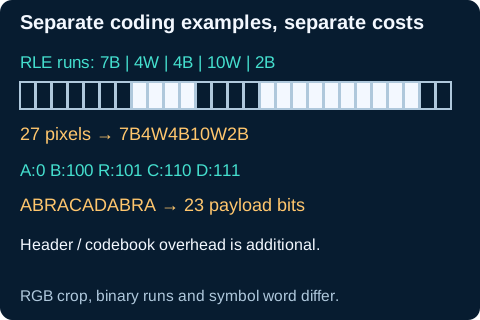 The five black/white runs contain 7 + 4 + 4 + 10 + 2 = 27 pixels, encoded as 7B4W4B10W2B. Separately, ABRACADABRA uses five 1-bit A codes and six 3-bit codes: 23 payload bits, plus the codebook or header.Open full diagram
SECTION 7
Lossless vs. Lossy — Strengths & Limitations
| Criterion | Lossless | Lossy |
|---|---|---|
| Data Fidelity | Exact reconstruction guaranteed | Approximation only; original unrecoverable |
| Typical Ratio | 2 : 1 to 4 : 1 | 5 : 1 to 50 : 1 or higher |
| Common Formats | ZIP, PNG, FLAC, GIF | JPEG, MP3, MPEG-4, AAC |
| Best For | Text, code, medical images, legal documents | Photos, music, video, streaming |
| Quality Setting | N/A — always perfect | User-adjustable quality slider (e.g., JPEG 1–100) |
| Repeated Compression | No degradation — output is bit-identical each time | Each round discards more data, causing generation loss |
Side-by-side comparison of lossless and lossy compression characteristics
KEY TAKEAWAY
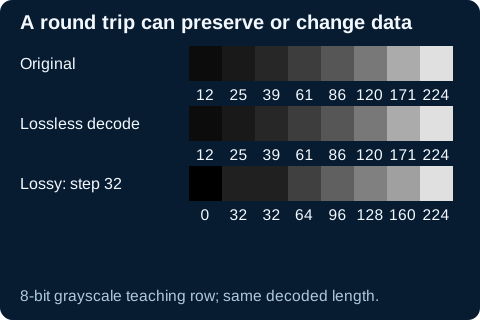 For these eight grayscale values, lossless decoding restores every value. Rounding to the nearest multiple of 32 changes seven values while preserving eight positions; 224 already lies on the quantization grid.Open full diagram
SECTION 8
Connections to Information Theory & Beyond
Data compression is not an isolated topic — it sits at the intersection of several deep ideas in computer science, including information theory, algorithmic complexity, and network efficiency. Shannon's source coding theorem proves that no lossless compression algorithm can, on average, encode messages using fewer bits per symbol than the entropy of the source. This theoretical floor applies universally — it constrains ZIP just as it constrains any future algorithm yet to be invented.
| Concept | AP CSP Level | Advanced Extension |
|---|---|---|
| Compression Ratio | Original ÷ Compressed, higher is better | Rate-distortion theory quantifies the optimal trade-off between compression ratio and quality loss in lossy systems |
| Huffman Coding | Variable-length codes based on frequency | Arithmetic coding achieves even closer-to-entropy performance by encoding entire messages as single fractions |
| Lossy Image | JPEG removes perceptually unimportant data | JPEG 2000 and HEIF use wavelet transforms and more advanced perceptual models for better quality at the same file size |
| Network Impact | Smaller files transfer faster over limited bandwidth | Adaptive bitrate streaming (e.g., HLS, DASH) dynamically adjusts lossy compression quality based on real-time network conditions |
How AP CSP compression concepts connect to more advanced computer science topics
Compression also has profound implications for the Internet of Things, cloud storage pricing, and sustainability — every byte we avoid transmitting reduces energy consumption in data centers and network infrastructure. As data generation continues to accelerate, the principles you learn in this lesson become even more relevant. Future courses in algorithms, machine learning (which increasingly uses learned compression models), and systems design will all build on these foundations.
SECTION 9
Practice Problems
Question 1: CONCEPTUAL
- A. The decompressed file will be smaller than the original file.
- B. The decompressed file will be identical to the original file.
- C. The decompressed file will contain most but not all of the original data.
- D. The decompressed file will be larger than the original because the compression metadata is added.
Show answer (B)
Question 2: BASIC CALCULATION
- A. 1 : 10
- B. 5 : 1
- C. 10 : 1
- D. 0.1 : 1
Show answer (C)
Question 3: INTERMEDIATE
- A. The PNG file can be converted back to the exact original pixel data.
- B. The JPEG file will always be larger than the PNG file.
- C. Repeatedly opening and re-saving the JPEG at the same quality setting can cause the image to degrade further.
- D. The PNG format uses lossy compression to achieve smaller file sizes than JPEG for photographs.
Show answer (AC)
Question 4: APPLIED
3 ptsShow answer
Question 5: CRITICAL THINKING
4 ptsShow answer
SUMMARY
Data Compression — Summary
Summary
Data compression reduces the number of bits needed to represent information by exploiting redundancy in the data. Lossless compression (ZIP, PNG, FLAC) guarantees that the original data can be perfectly reconstructed, making it essential for text, code, and sensitive records. Lossy compression (JPEG, MP3, MPEG) permanently discards perceptually less important data to achieve much smaller file sizes, which is acceptable for consumer media but irreversible. Key algorithms include run-length encoding (replacing runs with counts), Huffman coding (shorter codes for frequent symbols), and dictionary-based methods like LZW.
The compression ratio (original size ÷ compressed size) quantifies effectiveness, and no algorithm can compress every input — highly random data resists compression. Shannon's entropy sets the theoretical floor for lossless compression. On the AP CSP exam, expect questions about when to use lossless vs. lossy, how compression affects data quality, and how to calculate compression ratios. Remember: lossless is reversible, lossy is not, and the right choice depends on context.