

SECTION 1
Historical Context & Motivation
Every interesting program must make decisions. From the earliest mechanical computing devices to modern software systems, the ability to choose between different courses of action based on circumstances has been the fundamental requirement that separates true computation from simple arithmetic. The concept of conditional execution — the idea that a machine can evaluate a condition and branch its behavior accordingly — is so central that Alan Turing identified it as one of the essential capabilities of any universal computing device. Without conditionals, a program would execute the same instructions in the same order every time, regardless of its input or state, making it no more powerful than a fixed recipe.
The journey from abstract mathematical logic to the if statements you write today involved breakthroughs in mathematics, electrical engineering, and programming language design. Understanding this history illuminates why conditionals work the way they do and why they appear in virtually identical form across every modern programming language.
1854 • Boolean Algebra
1936 • Turing Machine
1945 • Stored-Program Architecture
1957 • FORTRAN's IF Statement
1972 • Structured Programming
The central question that conditionals address is deceptively simple: how can a program respond differently to different situations? Whether an app decides to display "Welcome back" versus "Please sign in," or a self-driving car decides to brake versus accelerate, the underlying mechanism is a conditional: evaluate a Boolean expression, then execute one code path or another based on the result.
SECTION 2
Core Principles & Definitions
Conditionals rest on a small set of interlocking ideas. A Boolean expression evaluates to either true or false. A selection structure — what most programmers call an if-statement — uses the result of that Boolean expression to determine which block of code to execute. The College Board's AP CSP framework uses the term selection to describe this pattern, distinguishing it from sequencing (executing statements in order) and iteration (repeating statements). Together, these three constructs are sufficient to express any computable algorithm.
Boolean Expression
true or false. Examples include relational comparisons like x > 10 and logical combinations like age >= 18 AND hasID.IF Statement
IF-ELSE Statement
Nested Conditionals
Logical Operators
AND, OR, and NOT combine or invert Boolean expressions, enabling compound conditions within a single conditional statement.KEY TAKEAWAY
SECTION 3
Visual Explanation — Flowchart of Conditional Logic
score ≥ 65 evaluates to TRUE, execution follows the left (green) path; when FALSE, it follows the right (red) path. Both paths converge after their respective blocks, and the program continues sequentially. This is the canonical IF-ELSE pattern used on the AP CSP exam.The flowchart above illustrates the fundamental structure of an IF-ELSE conditional. Notice that the program begins with sequential execution — reading input into the variable score — before reaching the decision point. The diamond node is the hallmark of a conditional in flowchart notation, and every conditional diamond has exactly two outgoing edges: one for TRUE and one for FALSE. Critically, the two paths rejoin after the conditional, meaning the program returns to sequential execution once the decision has been resolved. This rejoining behavior ensures that code written after the conditional is always reached regardless of which branch was taken.
AP CSP Pseudocode Notation
IF(condition) { ... } and an IF-ELSE as IF(condition) { ... } ELSE { ... }. In block-based (visual) pseudocode, these appear as interlocking puzzle-piece shapes. Both representations are equivalent and may appear on the exam.SECTION 4
How Conditionals Work — Boolean Logic in Depth
The engine that drives every conditional is a Boolean expression. Understanding how these expressions are constructed and evaluated is essential for writing correct conditionals and predicting program behavior on the AP exam. Boolean expressions are built from relational operators (which compare values) and logical operators (which combine or negate Boolean values). Together, they let you express conditions of arbitrary complexity within a single IF statement.
Relational Operators
| Operator | Meaning | Example | Result |
|---|---|---|---|
= | Equal to | 5 = 5 | true |
≠ | Not equal to | 5 ≠ 3 | true |
> | Greater than | 7 > 10 | false |
< | Less than | 3 < 8 | true |
≥ | Greater than or equal to | 5 ≥ 5 | true |
≤ | Less than or equal to | 9 ≤ 4 | false |
Relational operators in AP CSP pseudocode
Logical Operators and Truth Tables
The three logical operators — AND, OR, and NOT — allow you to combine simple Boolean expressions into compound ones. AND requires both operands to be true for the result to be true. OR requires at least one operand to be true. NOT inverts a single Boolean value. Mastering these truth tables is critical because AP exam questions frequently ask you to trace through compound conditions.
| A | B | A AND B | A OR B |
|---|---|---|---|
true | true | true | true |
true | false | false | true |
false | true | false | true |
false | false | false | false |
Truth table for AND and OR logical operators
COMPOUND CONDITION PATTERN
The block executes only when both condition₁ and condition₂ evaluate to true. If either is false, the entire compound expression evaluates to false and the block is skipped.
DE MORGAN'S LAW
De Morgan's Laws describe how NOT distributes over AND and OR. The negation of a conjunction becomes a disjunction of negations, and vice versa. While not explicitly tested by name on the AP exam, these equivalences frequently appear in questions that ask whether two conditional expressions produce the same result.
SECTION 5
Nested and Chained Conditionals
Real-world decisions rarely reduce to a single yes-or-no question. When a program must distinguish among three or more possible outcomes, you have two primary strategies: nested conditionals and chained conditionals (sometimes called else-if chains). A nested conditional places one IF or IF-ELSE entirely inside the block of another, creating a tree structure where each level adds a new decision. A chained conditional uses a sequence of IF / ELSE IF / ELSE clauses evaluated top-to-bottom, where only the first true condition's block executes. Both approaches can express the same logic, but they differ in readability and maintainability — an important consideration when designing algorithms.
score ≥ 90. If true, the grade is "A" and the remaining diamonds are never reached. If false, execution flows to the next nested diamond, checking score ≥ 80, and so on. Notice that each FALSE branch leads deeper into the nesting tree, while each TRUE branch terminates with an assignment.In the AP CSP pseudocode, the nested conditional shown in the diagram above would be written as follows: the outer IF(score ≥ 90) block assigns "A", and its ELSE block contains another IF(score ≥ 80) which assigns "B", whose ELSE block contains yet another IF(score ≥ 65) assigning "C" or, in its own ELSE block, "F". The key insight is that the order of conditions matters: because a score of 95 satisfies both score ≥ 90 and score ≥ 80, the algorithm must test the most restrictive condition first to ensure the correct grade is assigned.
Nesting vs. Compound Conditions
IF(x > 0) { IF(x < 100) { ... } } is logically equivalent to IF(x > 0 AND x < 100) { ... }. Recognizing these equivalences is a frequently tested skill on the AP exam.SECTION 6
Worked Example — Tracing a Conditional Algorithm
Consider the following pseudocode that determines whether a person can ride a roller coaster based on their height and whether they have parental consent. We will trace through the algorithm for two different sets of inputs to see exactly how the conditional logic directs execution.
THE PSEUDOCODE
height ← INPUT()
consent ← INPUT()
IF (height ≥ 48)
{
    DISPLAY("You may ride.")
}
ELSE
{
    IF (consent = true)
    {
        DISPLAY("You may ride with supervision.")
    }
    ELSE
    {
        DISPLAY("Sorry, you may not ride.")
    }
}
Trace 1: height = 52, consent = false
- 1
Step 1 — Read Inputs
The program reads the two inputs and assigns them to variables:height ← 52andconsent ← false. - 2
Step 2 — Evaluate Outer Condition
The first conditional evaluatesheight ≥ 48. Substituting:52 ≥ 48evaluates totrue.Condition is TRUE → enter the IF block - 3
Step 3 — Execute IF Block
Because the condition was true, the program executesDISPLAY("You may ride."). The entire ELSE block (including its nested conditional) is skipped entirely. The consent variable is never even checked.Output: "You may ride."
Trace 2: height = 42, consent = true
- 1
Step 1 — Read Inputs
The program assignsheight ← 42andconsent ← true. - 2
Step 2 — Evaluate Outer Condition
The first conditional evaluates42 ≥ 48, which isfalse. The IF block is skipped, and execution moves to the ELSE block.Condition is FALSE → enter the ELSE block - 3
Step 3 — Evaluate Nested Condition
Inside the ELSE block, the nested conditional evaluatesconsent = true. Sinceconsentistrue, this evaluates totrue.Nested condition is TRUE - 4
Step 4 — Execute Nested IF Block
The program executesDISPLAY("You may ride with supervision."). The inner ELSE block ("Sorry, you may not ride.") is skipped.Output: "You may ride with supervision."
TRACING STRATEGY
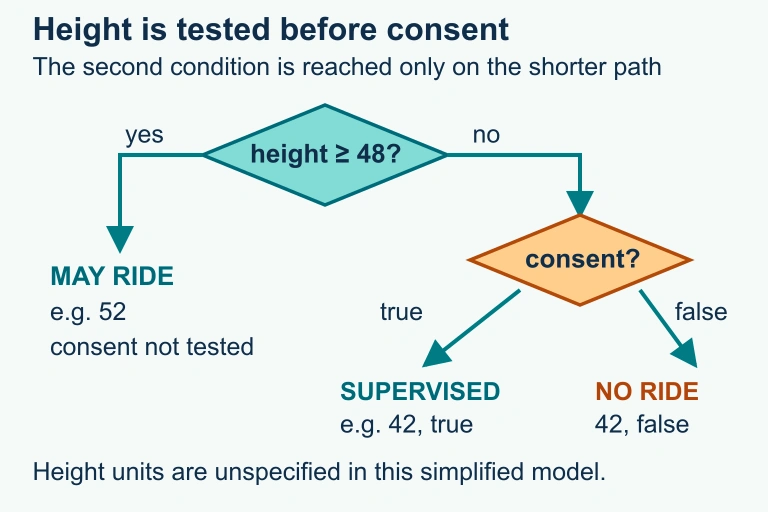 Test height ≥ 48 first. A tall rider is allowed without testing consent. A shorter rider needs consent for supervised riding; otherwise riding is denied. The consent value has already been input.
SECTION 7
Common Pitfalls & Best Practices
Conditionals are conceptually straightforward, but subtle errors can produce programs that appear to work in most cases yet fail on specific inputs. The AP exam frequently tests your ability to recognize these pitfalls and select the correct implementation from several plausible options. The table below catalogs the most common mistakes alongside their corrections.
| Pitfall | What Goes Wrong | Correct Approach |
|---|---|---|
| Overlapping conditions | Using separate IF statements instead of ELSE IF means multiple blocks can execute for the same input. A score of 95 would match both score ≥ 90 and score ≥ 80. | Use IF-ELSE or nested conditionals so that only one branch executes. Alternatively, test from most restrictive to least restrictive. |
| Off-by-one boundary errors | Using > when ≥ is intended (or vice versa) causes the boundary value to fall into the wrong branch. | Explicitly test the boundary value as a trace case. Ask: which branch should a score of exactly 65 enter? |
| Wrong logical operator | Using AND when OR is needed (or vice versa). For instance, age < 13 AND age > 65 is always false because no single value can be both less than 13 and greater than 65. | Substitute concrete values to verify. The intended condition is likely age < 13 OR age > 65. |
| Unreachable ELSE | The conditions in a chain may collectively cover all possible values, making a final ELSE block unreachable. This is not necessarily an error but can indicate redundant logic. | Review whether the ELSE block can actually be reached with a valid input. If not, consider simplifying the conditional chain. |
| Misplaced code (scope error) | Placing a statement inside a conditional block when it should execute unconditionally (or vice versa). Indentation errors in text-based code exacerbate this. | Carefully match braces or indentation to the intended scope. In AP pseudocode, the curly braces { } delineate conditional blocks unambiguously. |
Common conditional logic pitfalls and their corrections
TESTING INSIGHT
x ≥ 65, you should test with 64, 65, and 66 to confirm that the boundary is handled correctly.SECTION 8
Connections to Advanced Concepts
The conditional structures you learn for AP CSP form the foundation for more sophisticated programming patterns you will encounter in later courses and professional development. Understanding where basic conditionals sit in the broader landscape of programming constructs helps you appreciate both their power and their limitations. The table below maps AP CSP conditional concepts to their advanced counterparts.
| AP CSP Concept | Advanced Extension | Context |
|---|---|---|
| IF-ELSE with Boolean condition | Pattern matching / Switch statements | Languages like Python (match-case), Java (switch), and Rust (match) provide multi-way branching syntax that is cleaner than long else-if chains. |
| Nested conditionals for multi-way decisions | Decision trees in machine learning | A decision tree classifier is essentially a deeply nested conditional trained from data, where each node tests a feature threshold. |
| Boolean expressions with AND/OR/NOT | Short-circuit evaluation | Most production languages evaluate AND left-to-right and stop as soon as a false operand is found (and OR stops at the first true), which has performance and correctness implications. |
| Tracing conditional execution paths | Code coverage & formal verification | Software engineers use tools that measure which conditional branches are exercised by a test suite, and formal methods can mathematically prove all paths behave correctly. |
AP CSP conditionals mapped to advanced programming concepts
Conditionals also interact deeply with iteration. A REPEAT UNTIL(condition) loop is, at the hardware level, implemented as a conditional branch instruction that either jumps back to the top of the loop or falls through to the next instruction. Similarly, robot movement problems on the AP exam combine conditionals with loops: a robot might use IF(CAN_MOVE(forward)) inside a REPEAT loop to navigate a grid without moving off the edge. Mastering conditionals therefore prepares you not only for selection questions but also for the iteration and robot-simulation questions that constitute a significant portion of the exam.
SECTION 9
Practice Problems
Question 1: CONCEPTUAL
x ← 15
IF (x > 10)
{
    DISPLAY("A")
}
IF (x > 5)
{
    DISPLAY("B")
}
What is displayed as a result of executing this code segment?- A. A
- B. B
- C. AB
- D. A B (on separate lines)
Show answer (C)
x > 10 and x > 5, both DISPLAY statements execute. DISPLAY in AP pseudocode does not automatically add a newline between calls within the same sequence, so the output is "AB". Option A is wrong because it ignores the second IF. Option B is wrong because it ignores the first IF. Option D is wrong because AP pseudocode's DISPLAY does not insert a line break by default.Question 2: BASIC CALCULATION
a ← 4
b ← 7
IF (a + b > 10)
{
    result ← a × b
}
ELSE
{
    result ← a + b
}
What value is stored in result after this code segment executes?- A. 4
- B. 7
- C. 11
- D. 28
Show answer (D)
a + b = 4 + 7 = 11. Since 11 > 10 evaluates to true, the IF block executes and result ← 4 × 7 = 28. Option A (4) and Option B (7) simply repeat the input values without any computation. Option C (11) would be the result if the ELSE branch had executed (result ← a + b), but since the condition is true, the ELSE branch is skipped.Question 3: INTERMEDIATE
IF (x > 0)
{
    IF (x < 100)
    {
        DISPLAY("in range")
    }
}
Code Segment 2:
IF (x > 0 AND x < 100)
{
    DISPLAY("in range")
}
Which of the following statements are true about these two code segments? (Select TWO answers.)- A. For all possible values of x, the two code segments produce the same result.
- B. Code Segment 1 will display "in range" for x = 0, but Code Segment 2 will not.
- C. Code Segment 2 is an example of using a compound Boolean expression to replace nested conditionals.
- D. Code Segment 1 evaluates both conditions even when x ≤ 0.
Show answer (A,C)
0 > 0 is false, so the inner conditional is never reached and nothing is displayed — identical behavior to Code Segment 2. Option D is wrong because in Code Segment 1, when x ≤ 0, the outer IF condition evaluates to false and the inner IF is skipped entirely — only the outer condition is evaluated.Question 4: APPLIED
3 ptsShow answer
bpm ← INPUT()
IF (bpm < 100)
{
    DISPLAY("Low")
}
ELSE
{
    IF (bpm < 140)
    {
        DISPLAY("Moderate")
    }
    ELSE
    {
        IF (bpm < 170)
        {
            DISPLAY("High")
        }
        ELSE
        {
            DISPLAY("Maximum")
        }
    }
}
Rubric (3 points):
Point 1 — Correct conditional structure: Uses IF-ELSE, nested conditionals, or independent IF statements with mutually exclusive conditions that cover all valid bpm values. Exactly one intensity level must be displayed. Valid independent conditions are bpm < 100; 100 ≤ bpm AND bpm < 140; 140 ≤ bpm AND bpm < 170; and bpm ≥ 170. Do not penalize a correct solution solely for using separate IF statements.Point 2 — Correct boundary conditions: The threshold values (100, 140, 170) are correctly placed with appropriate relational operators. Because the ELSE structure guarantees that the second condition is only reached when bpm ≥ 100, testing bpm < 140 alone is sufficient for the "Moderate" range. Each boundary value maps to the correct category.
Point 3 — Correct output: All four intensity levels ("Low", "Moderate", "High", "Maximum") are correctly displayed for their respective ranges, and exactly one output is produced for any input value.Question 5: CRITICAL THINKING
4 ptsyear ← INPUT()
IF (year MOD 4 = 0)
{
DISPLAY("Leap year")
}
ELSE
{
DISPLAY("Not a leap year")
}
The actual rules for leap years are: a year is a leap year if it is divisible by 4, EXCEPT that years divisible by 100 are NOT leap years, UNLESS the year is also divisible by 400 (in which case it IS a leap year).
(a) Identify a specific input value for which the student's code produces an incorrect result, and explain why.
(b) Write a corrected version of the algorithm using nested or compound conditionals that correctly implements all three leap year rules.
(c) Explain how you could test your corrected algorithm to ensure it handles all edge cases. Identify at least three specific test values and the expected output for each.Show answer
year ← INPUT()
IF (year MOD 400 = 0)
{
    DISPLAY("Leap year")
}
ELSE
{
    IF (year MOD 100 = 0)
    {
        DISPLAY("Not a leap year")
    }
    ELSE
    {
        IF (year MOD 4 = 0)
        {
            DISPLAY("Leap year")
        }
        ELSE
        {
            DISPLAY("Not a leap year")
        }
    }
}
Alternatively, a compound Boolean expression approach is acceptable: IF ((year MOD 4 = 0 AND year MOD 100 ≠ 0) OR (year MOD 400 = 0)). The algorithm must correctly handle all three rules.
Point 3 — Testing strategy with specific values (part c, partial): The student identifies at least three test values that exercise different conditional branches. Strong test values include: (1) year = 2024 → Leap year (divisible by 4, not by 100); (2) year = 1900 → Not a leap year (divisible by 100, not by 400); (3) year = 2000 → Leap year (divisible by 400). A fourth valuable test: year = 2023 → Not a leap year (not divisible by 4).
Point 4 — Justification of testing strategy (part c, complete): The student explains that their test values are chosen to cover each branch of the conditional — each rule's boundary is exercised by at least one test case. This demonstrates understanding of boundary-value testing and the principle that every conditional path should be verified.SUMMARY
Conditionals — Summary
Summary
Conditionals are selection structures that enable a program to choose between different execution paths based on the evaluation of a Boolean expression. The simplest form, the IF statement, executes a block of code only when its condition is true. The IF-ELSE statement extends this by providing an alternative block that executes when the condition is false, guaranteeing that exactly one of the two paths is always taken. Nested conditionals place one conditional inside another to handle multi-way decisions, and compound Boolean expressions using AND, OR, and NOT can often simplify nested structures into a single, readable condition.
For the AP CSP exam, focus on three essential skills: tracing conditional execution by evaluating Boolean expressions step-by-step with specific input values; recognizing logical equivalences between nested conditionals and compound conditions; and identifying common pitfalls such as overlapping conditions and off-by-one boundary errors. Together with sequencing and iteration, conditionals form the three fundamental building blocks from which all algorithms are constructed.