01 / 21

Searching
Algorithms

Master linear search and binary search: understand how each works, analyze their time complexity, and know when to apply each approach.

AP Computer Science A

What Is Searching?

Searching is the process of locating a target value within a data structure. In AP Computer Science A, you work primarily with arrays and ArrayLists. A search algorithm inspects elements until it either finds the target or determines it is absent.

Linear Search
Check each element one by one from start to end.
Binary Search
Repeatedly halve the search space using sorted order.

Why Efficiency Matters

Imagine searching for a name in a phone book with 1,000,000 entries. A linear scan could require up to 1,000,000 comparisons. Binary search needs at most \( \lceil \log_2 1{,}000{,}000 \rceil = 20 \) comparisons: a dramatic difference.

\( n = 1{,}000{,}000 \)
Linear: up to 1,000,000 steps
\( \log_2 n \approx 20 \)
Binary: at most 20 steps

Key Vocabulary

Target
The value you are looking for in the data structure.
Index
The position where the target is found, or \( -1 \) if absent.
Sorted
Elements arranged in ascending (or descending) order: required for binary search.
Comparisons
The primary operation counted when analyzing search efficiency.
Best / Worst Case
Minimum and maximum comparisons an algorithm may need.
Big-O Notation
Describes the upper bound on growth rate, e.g. \( O(n) \), \( O(\log n) \).

Linear Search: Step by Step

3 8 1 5 7 2 9 0 1 2 3 4 5 6 scan left to right
\( \text{target} = \)7

Linear Search: Java Code

public static int linearSearch(int[] arr, int target) { for (int i = 0; i < arr.length; i++) { if (arr[i] == target) { return i; // found at index i } } return -1; // not found }
Best Case
\( O(1) \): target is the first element.
Worst Case
\( O(n) \): target is last or absent.
Precondition
None: works on any array, sorted or unsorted.

Binary Search: Divide and Conquer

Binary search exploits sorted order. Compare the target to the middle element. If the target is smaller, search the left half; if larger, search the right half. Repeat until found or the range is empty.

Pass 1: 2 5 8 12 15 23 31 42 50 mid
\(\text{target}=\)31
\(31 > 15 \to \text{right}\)
Pass 2: 23 31 42 50 mid
\(31 == 31 \) ✓
Found! 31
\(\text{index} = 6\)

Binary Search: Java Code

public static int binarySearch(int[] arr, int target) { int low = 0, high = arr.length - 1; while (low <= high) { int mid = (low + high) / 2; if (arr[mid] == target) return mid; else if (arr[mid] < target) low = mid + 1; else high = mid - 1; } return -1; }

A sorted collection makes discarded search ranges meaningful

An archivist opens a specimen drawer beside unordered return trays.Sorted order makes it possible to discard an entire search range after one comparison. An unsorted collection does not support the same elimination.

Binary search with Java indices
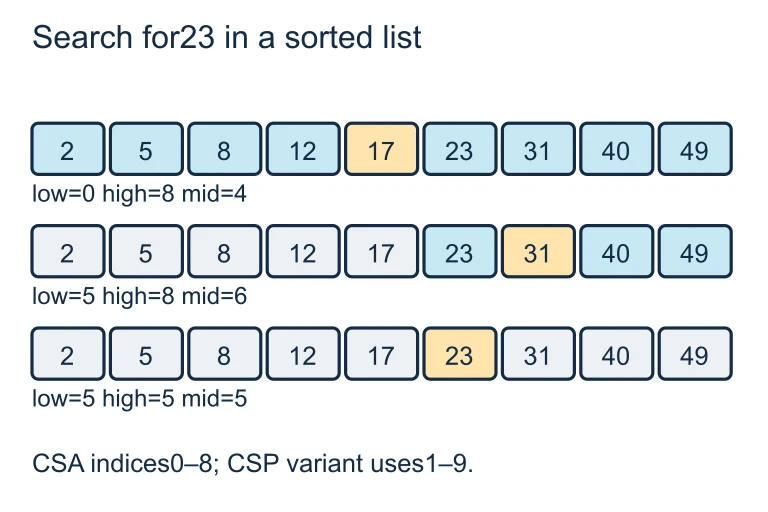
Three rows highlight midpoint indices 4, 6 and 5 as excluded values fade.Search this sorted nine-value array for 23. The tested midpoint values are 17, 31 and 23; Java indices 0 through 8 lead to a return value of 5. Each failed comparison excludes its tested midpoint.

Count comparisons as the list grows
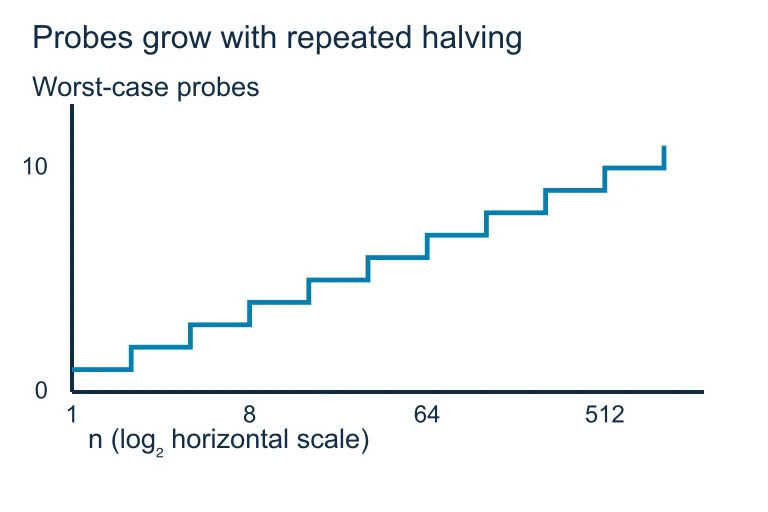
A step graph plots the exact worst-case binary-search probe count against list size on a log₂ horizontal axis.For inclusive midpoint binary search on n ≥ 1 items, the maximum number of probes is floor(log₂ n) + 1. The horizontal axis uses a log₂ scale; the count measures search probes after sorting.

Binary Search: Complexity

Best Case
\( O(1) \): the middle element is the target on the first check.
Worst Case
\( O(\log_2 n) \): halve the array until one element remains.

For an array of 1,024 elements, binary search needs at most \( \log_2 1024 = 10 \) comparisons. Linear search could need up to 1,024.

Linear vs. Binary: Key Distinction

Linear Search Binary Search
Precondition None Sorted array
Best Case \( O(1) \) \( O(1) \)
Worst Case \( O(n) \) \( O(\log n) \)
Approach Sequential scan Divide and conquer
Works on unsorted? Yes No
Implementation Simple loop Track low, mid, high

How to Choose an Algorithm

1
Check if the data is sorted. If you are not guaranteed sorted order, use linear search (or sort first, then binary search).
2
Consider the size of the data. For small arrays (\( n < 20 \)), linear search is fast enough. For large arrays, binary search is far superior.
3
Consider repeated searches. If you search many times, sorting once at \( O(n \log n) \) and then using binary search \( O(\log n) \) per query is efficient.
4
Implement carefully. For binary search, compute \( \text{mid} \) correctly, update \( \text{low} \) and \( \text{high} \) properly, and use \( \leq \) (not \( < \)) in the loop condition.

Example 1: Linear Search Trace

10 4 7 1 9 3 0 1 2 3 4 5
\( \text{target} = \)6
Trace: \( 10 \neq 6, 4 \neq 6, 7 \neq 6, 1 \neq 6, 9 \neq 6, 3 \neq 6 \)
All checked → return \( -1 \) (not found)
Comparisons made: 6 (worst case for \( n=6 \))

Example 2: Binary Search Trace

Sorted array: [2, 5, 8, 12, 15, 23, 31, 42, 50]. Target: 8.

1
\(\text{low}=0, \text{high}=8, \text{mid}=4\). \( \text{arr}[4]=15 \). Since \( 8 < 15 \) → search left: set \( \text{high}=3 \).
2
\(\text{low}=0, \text{high}=3, \text{mid}=1\). \( \text{arr}[1]=5 \). Since \( 8 > 5 \) → search right: set \( \text{low}=2 \).
3
\(\text{low}=2, \text{high}=3, \text{mid}=2\). \( \text{arr}[2]=8 \). Found! Return index 2.

Example 3: Counting Comparisons

An array has \( n = 1{,}000 \) sorted elements. What is the maximum number of comparisons for binary search?

1
Apply the formula: max comparisons = \( \lceil \log_2 n \rceil \).
2
Compute: \( \log_2 1000 \approx 9.97 \).
3
Round up: \( \lceil 9.97 \rceil = 10 \). At most 10 comparisons.

Common Mistakes

✕ Using Binary on Unsorted Data
Binary search requires sorted order. Applying it to unsorted data gives wrong results, not just slower results.
✕ Off-by-One in Loop Condition
Use \( \text{while (low} \leq \text{high)} \), not \( \text{while (low} < \text{high)} \). The latter misses checking the last remaining element.
✕ Wrong Mid Update
Setting \( \text{low} = \text{mid} \) or \( \text{high} = \text{mid} \) instead of \( \text{mid} + 1 \) / \( \text{mid} - 1 \) causes an infinite loop.
✕ Confusing Index and Value
Search returns the index of the target, not the value itself. Returning \( \text{arr}[\text{mid}] \) instead of \( \text{mid} \) is a common error.
✕ Integer Overflow in Mid
For very large arrays, \( (\text{low} + \text{high}) \) can overflow. Safer: \( \text{mid} = \text{low} + (\text{high} - \text{low}) / 2 \).

Summary Comparison

Linear Search Binary Search
Time (Best) \( O(1) \) \( O(1) \)
Time (Worst) \( O(n) \) \( O(\log n) \)
Sorted Required? No Yes
Implementation Single for-loop While-loop with low/high/mid
\( n = 1{,}000{,}000 \) Up to 1,000,000 steps Up to 20 steps
When to Use Unsorted or small data Sorted and large data

Question 1 of 5

What is the worst-case time complexity of binary search on a sorted array of \( n \) elements?

Question 2 of 5

Which statement about linear search is true?

Question 3 of 5

In the binary search code below, what happens if the loop condition is while (low < high) instead of while (low <= high)?

Question 4 of 5

A sorted array has 2,048 elements. What is the maximum number of comparisons binary search will make?

Question 5 of 5

Given the sorted array [3, 7, 11, 18, 24, 30] and target 18, what is the sequence of values at mid that binary search examines?