Objects
Instances of Classes
Learn how classes serve as blueprints and how objects bring them to life as individual instances in Java.
What Is an Object?
In Java, an object is a specific instance of a class. It exists in memory, holds its own data (state), and can perform actions (behavior). Think of it as a real, tangible thing built from a template.
What Is a Class?
A class is a blueprint or template that defines what data an object will store and what actions it can perform. It specifies instance variables (state) and methods (behavior), but it does not occupy memory as an object itself.
From Blueprint to Objects
One ticket office counter, many fixed ticket IDs
 Separate tickets provide an analogy for separate objects. In the Dog example, each instance has its own name and age fields.
Each object keeps its own state
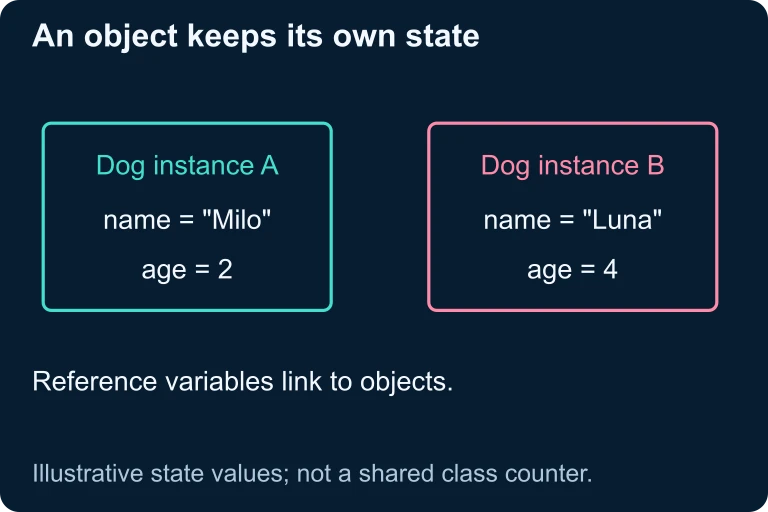 Suppose two Dog instances store Milo, age 2, and Luna, age 4. Each name and age belongs to its own instance. Changing one object’s fields does not automatically change the other object.
Creating Objects with new
In Java, you create an object using the new keyword followed by a call to the class's constructor. This allocates memory and initializes the object.
The Constructor
A constructor is a special method that runs when an object is created. It has the same name as the class and no return type. Its job is to initialize instance variables.
Reference vs. Object
Class vs. Object: Key Differences
| Class | Object | |
|---|---|---|
| Definition | Blueprint / template | Instance of a class |
| Memory | No memory allocated | Allocated on the heap |
| Created with | class keyword | new keyword |
| Quantity | Defined once | Many can exist |
| Holds data? | Defines structure only | Stores actual values |
Understanding null References
A reference variable can be set to null, meaning it points to no object. Calling a method on a null reference causes a NullPointerException at runtime.
How to Create and Use an Object
Example 1: Simple Object Creation
Example 2: Multiple Objects, One Class
Example 3: Reference Aliasing
Two collaborators work on one shared model
 Two variables can provide access to one shared object. Copying a reference creates another access path; it does not duplicate the object.
Follow object identity
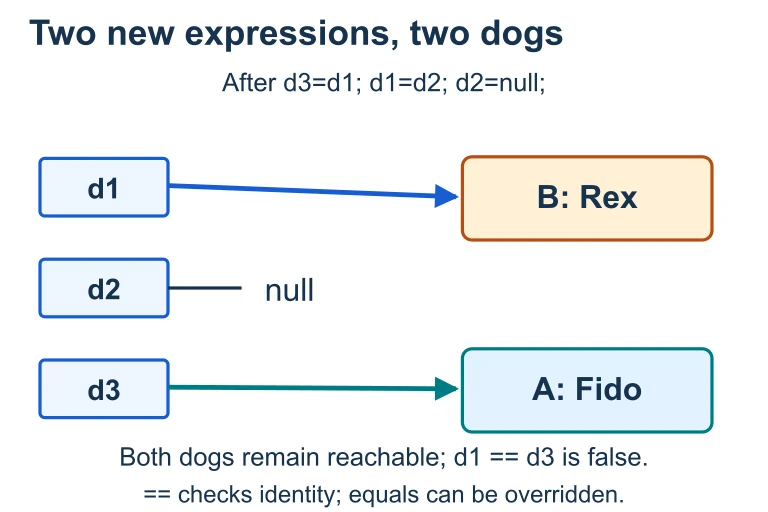 Two new expressions create Fido and Rex. After the assignments, d1 refers to Rex, d3 refers to Fido and d2 is null. Both objects remain reachable; == compares reference identity, while equals depends on the class’s implementation.
Calling Methods with Dot Notation
Once you have an object reference, you invoke its methods using dot notation: the reference name, a dot, then the method name with parentheses.
Common Mistakes to Avoid
Summary: Key Concepts
| Concept | Definition | Example |
|---|---|---|
| Class | Blueprint defining state and behavior | class Dog { ... } |
| Object | Instance created from a class | new Dog("Rex", 2) |
| Constructor | Special method that initializes objects | public Dog(String n, int a) |
| Reference | Variable storing an object's address | Dog d = ... |
| null | Reference pointing to no object | Dog d = null; |
Question 1 of 5
Which keyword is used to create a new object in Java?
Question 2 of 5
Given the Student class from the examples, what is the output of the following code?
Question 3 of 5
What happens when you execute: Dog d = null; d.bark();?
Question 4 of 5
Which statement about constructors is correct?
Question 5 of 5
Consider:
Student s1 = new Student("A", 3.5);
Student s2 = new Student("A", 3.5);
How many objects exist in memory?