01 / 21

Methods: Passing &
Returning References

Understand how Java handles object references when passed to and returned from methods, and why aliasing matters.

AP Computer Science A

What Is a Reference?

In Java, variables that hold objects don't store the object itself. Instead, they store a reference: a pointer to the object's location in memory. Think of it as an address that tells Java where the actual data lives on the heap.

myDog reference points to Dog Object name: "Rex" age: 5 (on the heap) STACK HEAP

Primitives vs References

Primitive Variables
Store the actual value directly in the variable. Copying creates an independent copy. Changing one does not affect the other.
Reference Variables
Store a memory address pointing to an object. Copying creates a second pointer to the same object. Both variables can mutate the same object.

Why Does This Matter?

Understanding reference passing is critical because it determines whether a method can permanently change the data your program works with. Getting this wrong leads to subtle bugs that are hard to track down.

1
Side effects: A method can modify an object's fields through a reference parameter, affecting the caller's data.
2
Aliasing: Multiple variables can reference the same object, so a change through one alias is visible through all others.
3
AP Exam tested: The College Board frequently tests whether students can trace object mutations across method calls.

The Core Rule

CALLER Dog d = new Dog(); copy of ref METHOD void feed(Dog p) Dog Object name: "Rex" age: 5 d points here p also points here Both d and p reference the SAME object!

What Can the Method Do?

✓ CAN Mutate Fields
Calling setters or modifying fields on the parameter changes the original object because both references point to the same memory.
✕ CANNOT Reassign Caller's Ref
Reassigning the parameter to a new object only changes the local copy of the reference. The caller's variable still points to the original.
void changeDog(Dog p) { p.setName("Max"); // Mutates the ORIGINAL object ✓ p = new Dog("Buddy"); // Only changes local ref ✕ }

Mutation vs Reassignment

Mutation Reassignment
Action p.setAge(10) p = new Dog()
What changes? The object's internal state The parameter's local pointer
Caller sees it? Yes No
Why? Same object, same heap address Local copy now points elsewhere

Two collaborators work on one shared model

Two collaborators adjust one blue articulated model while a second model stands apart.Two variables can provide access to one shared object. Copying a reference creates another access path; it does not duplicate the object.

Mutation and parameter reassignment
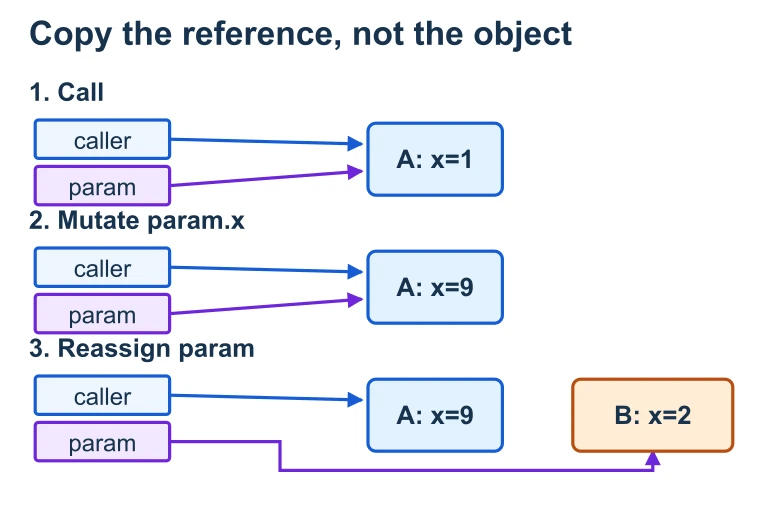
Caller and parameter references point to object A; after A is mutated, only the parameter is redirected to B.Java passes every argument by value. A copied reference initially reaches the same object, so its mutation is shared. Reassigning the parameter to a new object leaves the caller’s reference pointing to the original object.

Returning References

A method can return a reference to an object. The caller receives a reference to the same object on the heap: no copy of the object is made.

Dog createDog(String name) { Dog d = new Dog(name); return d; // returns a reference to the new Dog } // Caller: Dog myDog = createDog("Rex"); // myDog now points to the Dog created inside the method

Understanding Aliasing

a b ArrayList ["cat", "dog"] List<String> b = a; a.add("fish") also changes b!

How to Trace Reference Passing

1
Draw the object on the heap. Give it an address or label. Write its initial field values.
2
Draw each variable as a box on the stack. Write the reference (address) it holds, not the object itself.
3
On a method call, create a new parameter box on the method's stack frame. Copy the reference value into it.
4
Trace each statement: Does it mutate via the reference (follows the arrow) or reassign the local variable (moves the arrow)?
5
After the method returns, the parameter's box is destroyed. Check: what does the original variable still point to?

Example 1: Mutation Through a Reference

public static void growOlder(Dog d) { d.setAge(d.getAge() + 1); } public static void main(String[] args) { Dog rex = new Dog("Rex", 5); growOlder(rex); System.out.println(rex.getAge()); // prints 6 }

Example 2: Reassignment Doesn't Escape

public static void replaceDog(Dog d) { d = new Dog("Buddy", 2); // local reassignment } public static void main(String[] args) { Dog rex = new Dog("Rex", 5); replaceDog(rex); System.out.println(rex.getName()); // still "Rex" }

Example 3: Mixed Operations

public static Dog upgrade(Dog d) { d.setAge(d.getAge() + 1); // Step A: mutates original d = new Dog("Max", 1); // Step B: local reassignment return d; // Step C: returns new Dog ref } Dog rex = new Dog("Rex", 5); Dog result = upgrade(rex); // rex.getName() → "Rex" rex.getAge() → 6 // result.getName() → "Max" result.getAge() → 1

The null Reference

A reference variable can hold the special value null, meaning it points to no object. Calling any method on a null reference throws a NullPointerException at runtime.

Dog d = null; d.getName(); // NullPointerException! public static void setNull(Dog d) { d = null; // only nullifies the LOCAL copy } Dog rex = new Dog("Rex", 5); setNull(rex); // rex is still NOT null — it still points to Rex!

Common Mistakes

✕ Thinking Java is pass-by-reference
Java passes a copy of the reference, not the reference itself. Reassigning the parameter never affects the caller.
✕ Confusing mutation with reassignment
Calling p.setX() mutates the shared object. Writing p = new Obj() only redirects the local copy.
✕ Forgetting aliasing side effects
If two variables reference the same object, a mutation through one is visible through the other. Always check for aliases.

Summary Table

Scenario Caller Affected? Reason
p.setField(val) Yes Mutates shared object
p = new Obj() No Reassigns local copy
p = null No Reassigns local copy
return p Yes (if captured) Caller receives a reference
p.getList().add(x) Yes Mutates nested object

Question 1 of 5

Consider the following code. What is printed?

Dog a = new Dog("Rex", 3); grow(a); System.out.println(a.getAge()); static void grow(Dog d) { d.setAge(d.getAge() + 2); }

Question 2 of 5

What does a.getName() return after this code runs?

Dog a = new Dog("Rex", 5); swap(a); static void swap(Dog d) { d = new Dog("Buddy", 1); }

Question 3 of 5

What is printed by this code?

ArrayList<String> list = new ArrayList<>(); list.add("A"); addItem(list); System.out.println(list.size()); static void addItem(ArrayList<String> x) { x.add("B"); }

Question 4 of 5

After this code runs, what does b.getName() return?

Dog a = new Dog("Rex", 5); Dog b = a; a.setName("Max");

Question 5 of 5

What is printed?

Dog r = new Dog("Rex", 3); Dog s = process(r); System.out.println(r.getAge() + " " + s.getAge()); static Dog process(Dog d) { d.setAge(10); d = new Dog("Max", 7); return d; }