2D Array
Traversals
Master row-major and column-major traversal patterns, nested loop mechanics, and common pitfalls when navigating two-dimensional arrays in Java.
What Is a 2D Array?
A 2D array is an array of arrays: the outer array holds references to inner arrays, each of which stores actual data values. Think of it as a grid with rows and columns.
The Memory Model
In Java, a 2D array is not a contiguous block of memory like in C. Each row is a separate 1D array object on the heap. The outer array stores references to these inner arrays.
Why Traversals Matter
Nearly every 2D array problem on the AP exam requires you to visit every element systematically. The order you visit determines what you can compute and how efficiently.
Row-Major Traversal
The outer loop iterates over rows, and the inner loop iterates over columns. This visits every element left to right, top to bottom.
Column-Major Traversal
Swap the loop order: the outer loop iterates over columns, the inner loop iterates over rows. This visits elements top to bottom, left to right.
Row-Major vs Column-Major
| Row-Major | Column-Major | |
|---|---|---|
| Outer loop | rows (\(\text{r}\)) | columns (\(\text{c}\)) |
| Inner loop | columns (\(\text{c}\)) | rows (\(\text{r}\)) |
| Visit order | Left → right, top → bottom | Top → bottom, left → right |
| Best for | Row sums, reading text | Column sums, vertical scans |
| AP CSA default? | ✓ Yes | Only when needed |
A restorer repairs a luminous pixel mosaic
 Grid algorithms turn a visual pattern into explicit row and column operations. Bounds checks determine which neighboring cells can be accessed.
Traversal order changes the first match
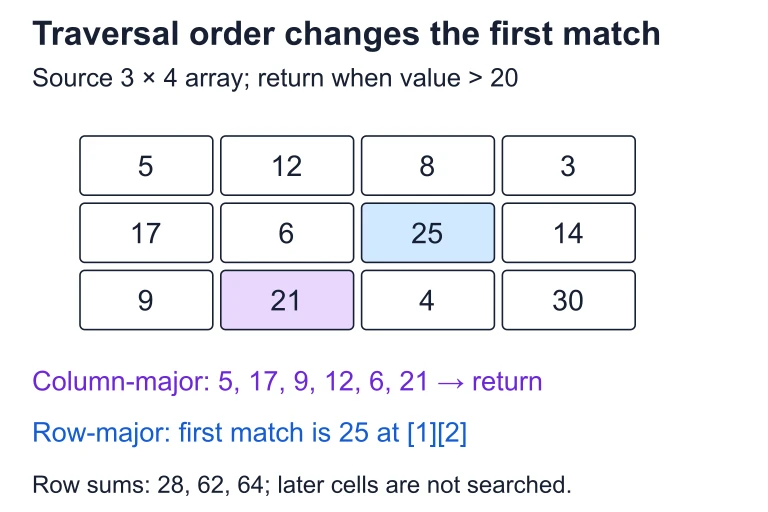 For this 3-by-4 array, column-major search finds the first value greater than 20 at [2][1]: 21. Row-major search instead reaches 25 at [1][2] first. The row sums are 28, 62 and 64.
Enhanced For-Each Loop
Java's enhanced for loop provides a cleaner syntax when you don't need the index. The outer loop retrieves each row (a 1D array), and the inner loop retrieves each element.
Step-by-Step Approach
Example: Sum All Elements
Given a 2D array, compute the total sum of all elements using a row-major traversal.
Example: Column Sums
Compute the sum of each column. This requires a column-major traversal so we can accumulate each column's total separately.
Example: Search for a Value
Search a 2D array for a target value and return its row and column. We need index-based loops because we must report the position.
Example: Reverse Each Row
Reverse the elements within each row of a 2D array. Here the inner loop only goes halfway across each row, swapping from both ends toward the center.
Understanding .length
The most critical detail on the AP exam: knowing which \(\text{.length}\) gives you what. Getting it wrong causes an ArrayIndexOutOfBoundsException.
Common Mistakes
Traversal Summary
| Pattern | Outer | Inner | Use Case |
|---|---|---|---|
| Row-major (standard) | row | col | Default; row ops |
| Column-major | col | row | Column ops |
| Enhanced for-each | \(\text{int[] row}\) | \(\text{int val}\) | Read-only scan |
| Partial traversal | row subset | col subset | Sub-grid, border |
| Diagonal | Single loop: \(\text{arr[i][i]}\) | Main diagonal | |
Question 1 of 5
Given \(\text{int[][] m = new int[4][6];}\), what does \(\text{m.length}\) return?
Question 2 of 5
Which traversal visits elements in the order: \(\text{arr[0][0], arr[1][0], arr[2][0], arr[0][1], arr[1][1], ...}\)?
Question 3 of 5
Consider the following code segment:
int[][] grid = {{1, 2, 3}, {4, 5, 6}};
int sum = 0;
for (int[] row : grid) {
for (int val : row) {
if (val % 2 == 0) { sum += val; }
}
}
What is the value of \(\text{sum}\) after the code executes?
Question 4 of 5
You need to double every element in a 2D array. Which loop type should you use?
Question 5 of 5
Consider the following method:
public static int mystery(int[][] arr) {
int result = arr[0][0];
for (int r = 0; r < arr.length; r++) {
for (int c = 0; c < arr[r].length; c++) {
if (arr[r][c] < result) {
result = arr[r][c];
}
}
}
return result;
}
What does the \(\text{mystery}\) method return?