
SECTION 1
Historical Context & Motivation
Software development in the 1950s and 1960s was characterized by a painful reality: every team wrote virtually every routine from scratch. Something as fundamental as reading input from a punch card required hand-crafted machine-level instructions that varied across hardware. As programs grew larger and more ambitious, this approach became untenable—projects exceeded budgets, deadlines slipped, and bugs multiplied. The computing community recognized that a standardized way to share and reuse code was essential to scaling the discipline.
The concept of an Application Program Interface (API) arose from the desire to separate what a piece of code can do from how it does it. By documenting the public-facing contracts of reusable components—constructors, methods, parameters, return types—developers could build on each other's work without understanding every implementation detail. This principle of information hiding became a cornerstone of modern software engineering and is at the heart of the Java language specification you study for the AP exam.
1960s • Subroutine Libraries
1972 • C Standard Library
1983 • Object-Oriented Paradigm
1996 • Java API & Javadoc
2003–Present • AP CS A Quick Reference
The central question this lesson addresses is deceptively simple: how do you use code that someone else wrote? Understanding the relationship between an API (the documented interface), a library (the collection of compiled classes), and your own client code is essential for every problem you will encounter on the AP Computer Science A exam.
SECTION 2
Core Principles & Definitions
Before writing any Java code, you need a precise vocabulary for the building blocks of reuse. The AP exam consistently tests whether you can read API documentation, identify what a method does based on its signature, and use library classes correctly without seeing their source code. The following four concepts form the foundation.
API (Application Program Interface)
Library (Class Library)
java.lang, java.util, and java.math.Method Signature
int indexOf(String str) tells you the input and output without revealing any implementation detail.Client Code
Abstraction & Information Hiding
KEY TAKEAWAY
SECTION 3
Visual Explanation: How Client Code Interacts with an API
The diagram below illustrates the relationship between your client code, the API boundary, and the library's internal implementation. Notice that the API acts as a contract: the client can see method signatures and documentation but is shielded from private fields, helper methods, and algorithmic details inside the library class.
In the diagram, notice that the client code on the left only references method names, parameters, and return types—elements defined in the API boundary. The client never directly accesses the char[] array inside String or the resizing logic inside ArrayList. This separation is the fundamental principle you must internalize: on the AP exam, you will be expected to use classes based solely on their documented API, as listed on the Quick Reference sheet.
 Two implementations can provide the same public counting behavior while storing their internal state differently. A representation change must preserve the interface’s promised behavior.
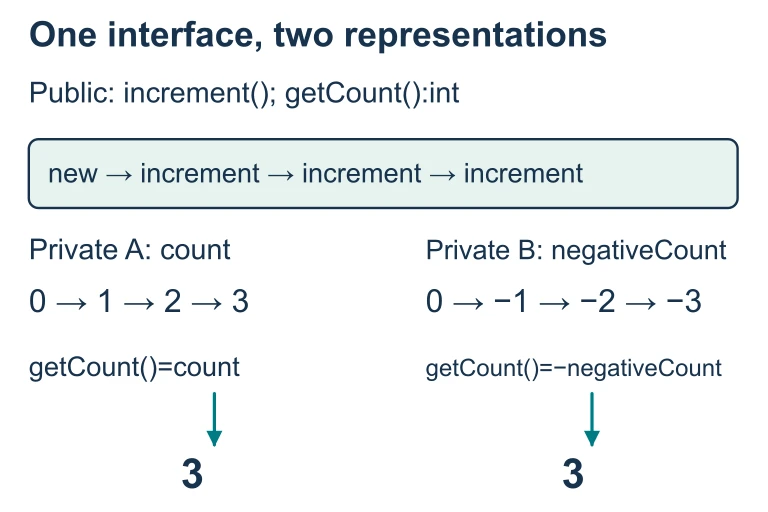 Starting at zero, one Counter stores count and increments it; another stores negativeCount and decrements it, returning its negation. Three increment calls make both getCount results 3. Their private representations differ while the public trace agrees.
SECTION 4
How APIs Work: Reading Method Signatures
Although this topic is not mathematical in the traditional sense, there is a precise "grammar" to Java method signatures that functions like a formula. Every method signature in the AP Quick Reference follows a consistent pattern that, once mastered, allows you to call any method correctly on the first try.
METHOD SIGNATURE PATTERN
returnType — the data type of the value sent back to the caller (e.g., int, String, boolean, or void if nothing is returned). methodName — the identifier you use to invoke the behavior. ParamType param — each parameter specifies the type and a descriptive name for the data the method needs to do its work.
CONSTRUCTOR SIGNATURE PATTERN
Constructors have no return type and share the class name. They initialize a new object. Example: ArrayList() creates an empty list.
When reading the Quick Reference, you should systematically extract four pieces of information from each entry: (1) whether the method is static or instance-based, (2) the return type, (3) the parameter list (types and order), and (4) any documented preconditions. A static method like Math.abs(int x) is called on the class itself, whereas an instance method like str.length() is called on a specific object. This distinction is tested frequently.
AP EXAM TIP
int compareTo(String other) tells you the method returns an int, takes one String argument, and must be called on a String object: "apple".compareTo("banana").SECTION 5
Key AP Library Classes & Packages
The AP Computer Science A exam focuses on a curated subset of Java's standard library. Understanding which classes belong to which packages, when you need an import statement, and whether methods are static or instance-level is essential. The table below organizes the primary classes you must know, along with representative methods from their APIs.
| Class | Package | Import Needed? | Key API Methods |
|---|---|---|---|
String | java.lang | No | length(), substring(), indexOf(), equals(), compareTo() |
Math | java.lang | No | abs(), pow(), sqrt(), random() (all static) |
Integer | java.lang | No | Integer.MIN_VALUE, Integer.MAX_VALUE, intValue() |
Double | java.lang | No | doubleValue() |
ArrayList<E> | java.util | Yes | add(), get(), set(), remove(), size() |
List<E> (interface) | java.util | Yes | Same methods as ArrayList (defines the API contract) |
AP Computer Science A — Essential Library Classes
java.lang (purple) are auto-imported, while java.util classes (cyan) require an explicit import statement.A critical distinction in the diagram is the difference between java.lang and java.util. The java.lang package is so fundamental to Java that it is automatically imported into every program—you can use String, Math, Integer, and Double without writing a single import statement. In contrast, ArrayList lives in java.util and requires import java.util.ArrayList; at the top of your file. Forgetting this import is a common source of compilation errors.
SECTION 6
Worked Example: Using Library Classes from Their API
Let's walk through a realistic scenario: given only the API documentation (as on the Quick Reference sheet), write a method that takes a sentence as a String and returns a new String containing only the characters from index 0 up to (but not including) the first space. If there is no space, return the entire string.
Extracting the First Word Using String API Methods
- 1
Step 1 — Identify Relevant API Methods
From the Quick Reference, we identify two String methods:int indexOf(String str)returns the index of the first occurrence ofstror −1 if not found;String substring(int from, int to)returns the substring from indexfrom(inclusive) to indexto(exclusive). - 2
Step 2 — Find the Space Index
Callint spaceIdx = sentence.indexOf(" ");For the input"Hello World", this returns 5. For"Java", it returns −1.spaceIdx = 5for "Hello World" - 3
Step 3 — Handle the Two Cases
IfspaceIdx == -1, there is no space, so return the original sentence. Otherwise, returnsentence.substring(0, spaceIdx). Notice we rely on the API's guarantee thatsubstringexcludes thetoindex, so the space character itself is not included. - 4
Step 4 — Write the Complete Method
Combining the steps:public static String firstWord(String sentence) { int spaceIdx = sentence.indexOf(" "); if (spaceIdx == -1) return sentence; return sentence.substring(0, spaceIdx); } - 5
Step 5 — Trace and Verify
Trace with "Hello World":indexOf(" ")→ 5,substring(0, 5)→ "Hello". Trace with "Java":indexOf(" ")→ −1, return "Java". Both results match expectations.firstWord("Hello World") → "Hello"
This example demonstrates the core workflow for using any library class: consult the API to identify which methods are available, match the method signatures to your problem, and compose calls with the correct argument types and order. At no point did we need to know how indexOf searches internally or how substring allocates memory—only what the API promised about their behavior.
SECTION 7
Static Methods vs. Instance Methods in the API
One of the most frequently tested distinctions on the AP exam is whether a method should be called on the class name (static) or on an object reference (instance). Getting this wrong causes a compilation error—a detail the exam exploits in its multiple-choice distractors. The table below clarifies the distinction with concrete examples drawn from the AP library.
| Feature | Static Method | Instance Method |
|---|---|---|
| Called on | The class name itself | A specific object (instance) |
| Syntax | ClassName.method(args) | objectRef.method(args) |
| AP Example | Math.sqrt(16.0) | "hello".length() |
| Object needed? | No — no constructor call required | Yes — must create or have a reference to an object |
| AP Classes | Math (all methods are static) | String, ArrayList, Integer, Double |
| Common error | Calling on an object: m.sqrt(16) ✗ | Calling on the class: String.length() ✗ |
Static vs. Instance Method Comparison
KEY TAKEAWAY
SECTION 8
Connection to Advanced Concepts: Interfaces, Polymorphism, and Frameworks
The API concept you have learned is the gateway to more powerful object-oriented design patterns. In college-level software engineering, APIs evolve into formal interfaces and abstract classes that enforce contracts at the compiler level. The AP exam introduces you to this through the List<E> interface: you can declare a variable as List<String> names and assign it an ArrayList<String>. The variable type references the API (the interface), while the actual object type is the library class. This is polymorphism in action.
| Concept | AP Level Understanding | Advanced / College Level |
|---|---|---|
| API | Read Quick Reference to call methods on String, Math, ArrayList | Design your own APIs using interfaces and abstract classes; version APIs for backward compatibility |
| Library | Use java.lang and java.util classes as a client | Build and distribute your own libraries (JAR files, Maven packages); manage dependencies |
| Abstraction | Understand that private details are hidden; trust the API contract | Apply SOLID principles; design by contract (preconditions, postconditions, invariants) |
| Polymorphism | Declare a variable as List<E> and assign an ArrayList<E> | Use dependency injection; program entirely to interfaces; strategy and observer design patterns |
AP-Level vs. Advanced Understanding
Beyond the AP exam, the concept of APIs expands into web APIs (REST, GraphQL), operating system APIs, and hardware APIs. In every case, the fundamental principle is the same: a documented contract allows one piece of software to use another without coupling to its implementation. Mastering this principle in the context of Java's class library gives you a transferable skill that applies across every programming language and software architecture you will encounter.
SECTION 9
Practice Problems
Question 1: CONCEPTUAL
- A. It provides the source code for all methods in a class so that programmers can modify them.
- B. It specifies the public constructors, methods, and their signatures so that client code can use a class without knowing its implementation.
- C. It is the compiled bytecode (.class file) that the JVM executes at runtime.
- D. It is a debugging tool that traces method calls during program execution.
Show answer (B)
Question 2: BASIC
String word = "Computer"; int result = word.indexOf("put");
What value is stored in result?- A. 3
- B. 4
- C. 6
- D. −1
Show answer (A)
indexOf(String str) returns the index of the first occurrence of the substring. In "Computer", the characters are indexed C(0), o(1), m(2), p(3), u(4), t(5), e(6), r(7). The substring "put" starts at index 3 where 'p' is located. B (4) is incorrect—this would be the index of 'u', not the start of "put". C (6) is incorrect—this might result from incorrectly calculating the index after "put" ends; the method returns where the substring starts, not where it ends or beyond. D (−1) is incorrect because "put" is found in the string; −1 would indicate no match.Question 3: INTERMEDIATE
Math class API?- A.
int num = (int)(Math.random() * 15) + 5; - B.
int num = (int)(Math.random() * 11) + 5; - C.
int num = (int)(Math.random() * 10) + 5; - D.
int num = (int)(Math.random() * 11) + 4;
Show answer (B)
Math.random() returns a double in [0.0, 1.0). To get integers from 5 to 15 inclusive, you need 11 possible values (15 − 5 + 1 = 11). Multiplying by 11 gives [0.0, 11.0), casting to int gives 0–10, and adding 5 gives 5–15. A is incorrect because multiplying by 15 produces [0.0, 15.0), casting to int gives 0–14, then adding 5 gives 5–19—too wide a range. C is incorrect because multiplying by 10 produces [0.0, 10.0), casting to int gives 0–9, then adding 5 gives 5–14—missing 15. D is incorrect because multiplying by 11 gives [0.0, 11.0) and adding 4 gives [4.0, 15.0). Casting to int truncates, producing 4–14. This shifts the range down by 1, missing 15 and incorrectly including 4.Question 4: APPLIED
4 ptscountLong that takes an ArrayList<String> called words and an int called threshold, and returns the number of strings in the list whose length is strictly greater than threshold. You must use only methods from the AP Quick Reference for ArrayList and String.Show answer
int and accept ArrayList<String> words and int threshold as parameters.
Point 2 — Correct loop over ArrayList: Uses words.size() as the loop bound and words.get(i) to access each element (or uses an enhanced for loop).
Point 3 — Correct comparison: Calls .length() on the String and compares with > threshold (strictly greater than, not >=).
Point 4 — Correct accumulation and return: Initializes a counter to 0, increments it when the condition is met, and returns the final count.
Sample Solution:
public static int countLong(ArrayList<String> words, int threshold) { int count = 0; for (String w : words) { if (w.length() > threshold) { count++; } } return count; }Question 5: CRITICAL THINKING
3 ptsString a = "hello"; String b = new String("hello"); System.out.println(a == b); System.out.println(a.equals(b));
Explain why the two print statements produce different output. In your answer, discuss the difference between == and the equals() method from the String API, and explain why understanding the API contract matters for correctness.Show answer
== operator compares object references (memory addresses), not content. Since a points to a String in the string pool and b is created with new (creating a separate object on the heap), they are different references. Thus a == b prints false.
Point 2 — Explains equals() API behavior: The String API specifies that equals(Object other) returns true if the two strings contain the same sequence of characters, regardless of whether they are the same object in memory. Since both contain "hello", a.equals(b) prints true.
Point 3 — Connects to API understanding: This illustrates why reading and trusting the API is critical. The API documents that equals() is the correct way to compare String content. A programmer who ignores the API and uses == will introduce subtle bugs—the code may appear to work with string literals (due to the string pool) but fail when strings are constructed dynamically. The API contract explicitly tells you which method provides the behavior you need.SUMMARY
Summary
Summary
An Application Program Interface (API) is the documented contract specifying the public constructors, methods, and constants that a class exposes to client code. A library is a packaged collection of compiled classes organized into packages (such as java.lang and java.util). The key principle of abstraction ensures that you use a class through its public interface without depending on hidden implementation details.
For the AP exam, you must fluently read method signatures (return type, name, parameter list), distinguish between static methods (called on the class, e.g., Math.abs()) and instance methods (called on an object, e.g., str.length()), know which classes require an import statement, and use the Quick Reference sheet to translate API documentation into correct Java method calls.